SaveInsta : Instagram Downloader
Download Videos, Photos, Reels, Story, IGTV & Highlight from Instagram
Why choose SaveVids.to?
SaveVids (formerly SaveInsta) is an online Instagram downloader that allows you to easily download various types of content from Instagram. You can use it to download videos, photos, stories, Reels, and IGTV from Instagram with just a few simple steps without installing software or registering an account.
SaveVids.to is a web-based tool that supports saving your favorite photos and videos directly in your web browser without installing any software or applications. Simply paste the Instagram link into the search box and click the Download button, and the tool will process and save the file to your device instantly.
Main features of SaveVids
#1 Instagram Photo Downloader
This tool helps you save Instagram photos in HD quality with ease. Notably, it allows you to select the image size that fits your needs, eliminating the need for any photo editing software.
#2 Instagram Video Downloader
Downloading Instagram videos with SaveVids is the fastest and most effective way to save your favorite videos in the highest quality (up to 4K). Whether it's a video from a post, story, reel, or highlight, this tool supports them all.
#3 Instagram Reels Downloader
With SaveVids, you can easily download Instagram Reels in MP4 format on any device, from PC and Mac to Android and iOS. All videos are saved to your device in HD quality with the original audio, just like watching on Instagram.
#4 Download IGTV Videos
IGTV is a long-form video format on Instagram, and SaveVids helps you download IGTV videos to your device. This means you can store and watch them anytime, even without a 3G or Wi-Fi connection.
#5 Instagram Story Downloader
SaveVids also allows you to download photos and videos from Instagram Stories before they disappear after 24 hours. Simply copy and paste the story link into the search box and click Download; the tool will scan and display all photos and videos in that story for you to choose and download.
How to Download Photos and Videos from Instagram?
Step 1: Open Instagram Application or visit Instagram.com
Step 2: Find a Photo or Video you want to Download and Copy Link by clicking (•••) icon
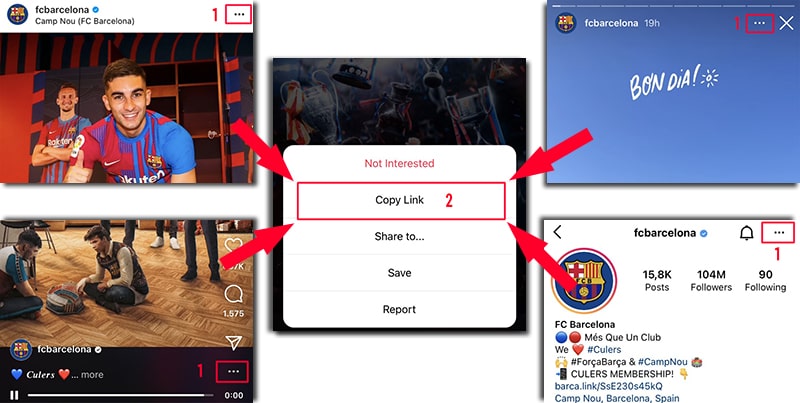
Step 3: Visit SaveVids.to and Paste Copid Link into Input Box and hit Download button.
Step 4: The Photo or Video you want to download will appear for a few seconds, then click the Download Photo or Download Video button to save the photo or video to your device.
Outstanding advantages of SaveInsta - Instagram Downloader?
Saveinsta is a powerful tool that helps you download content from Instagram quickly and easily. Here are the reasons that make Saveinsta the best choice:
✅ Free, unlimited downloads
Saveinsta allows you to download photos, videos, story, highlights, IGTV and IG Reels from Instagram absolutely free and with unlimited downloads.
✅ No need to install the app
You can use Saveinsta directly on your browser without installing any software, helping to save space on your device.
✅ Supports all devices
Saveinsta works on all devices, including PC, Mac, Android and iOS, making it easy for you to download content anytime, anywhere.
✅ Highest quality
Videos and images are downloaded in the highest possible quality, giving you the best viewing experience.
✅ Simple interface, easy to use
With just a few simple steps – copy the link, paste it into Saveinsta and download – you can immediately own the content you want.
Privacy & Copyright
SaveVids.to is committed to respecting privacy and content copyright on Instagram. We only provide download support for public content, subject to the following guidelines:
👉 Only supports downloading public content
This tool can only download photos, videos, IG Reels, stories, Highlights and IGTV from public accounts on Instagram. We do not support downloading content from private accounts without valid access rights.
👉 Does not store or use user data
Saveinsta does not store any video files, photos or personal data of users. All downloads are downloaded directly from Instagram's servers and stored on your device.
👉 Do not use the content for commercial purposes
All content downloaded via Saveinsta should be used for personal use only. If you want to use content for commercial purposes, make sure you have permission from the copyright owner.
👉 Comply with Instagram policies
We encourage users to comply with Instagram's terms and policies. Downloading content without the owner's permission may violate Instagram's terms of use.
SaveVids.to was born with the purpose of helping you download videos and photos from your account easier and faster. We reserve the right not to provide services if you use this tool to violate copyright or violate the privacy rights of others.
Read our terms of service 👉here👈
Frequently Asked Questions (FAQ)
What is Instagram Downloader?
How can I download videos and photos from Instagram?
To download videos and photos from Instagram, follow these steps:
Step 1: Copy the URL of the Instagram content you wish to download.
Step 2: Paste the Instagram URL into the designated input box on SaveVids.to
Step 3: Click the Download button for the tool to start processing.
Step 4: You will see the photo or video you want to download. Underneath it, click on the "Download Photo" or "Download Video" button, and the file will be saved to your device.
Please note that SaveVids.to is compatible with all devices, including PCs, Macs, Android devices, and iOS devices.
How can I download Instagram videos and photos on my iPhone or iPad?
To download Instagram videos and photos on iPhone or iPad, follow these three steps:
- Visit SaveVids.to using the Safari browser.
- Paste the post link with the photo or video you want to download into the search box.
- Tap the Download button to save the photo or video to your device.